Minecraft Snapshots are publicly tested builds that allow you to get access to stuff like the Caves and Cliffs update early. Snapshots are available for the Java version of Minecraft, but there is also a way to see features early on the Bedrock version, too. Test betas for the bedrock version on Xbox, Android, and Windows 10 are simply called Bedrock betas. They’re not the same as snapshots. but they do include a bunch of new features. In this tutorial I will show you how to get Minecraft Snapshots or Minecraft Bedrock Betas.
How To Get Snapshots on Minecraft Java
1. Open Minecraft Launcher
2. Click on the installations tab
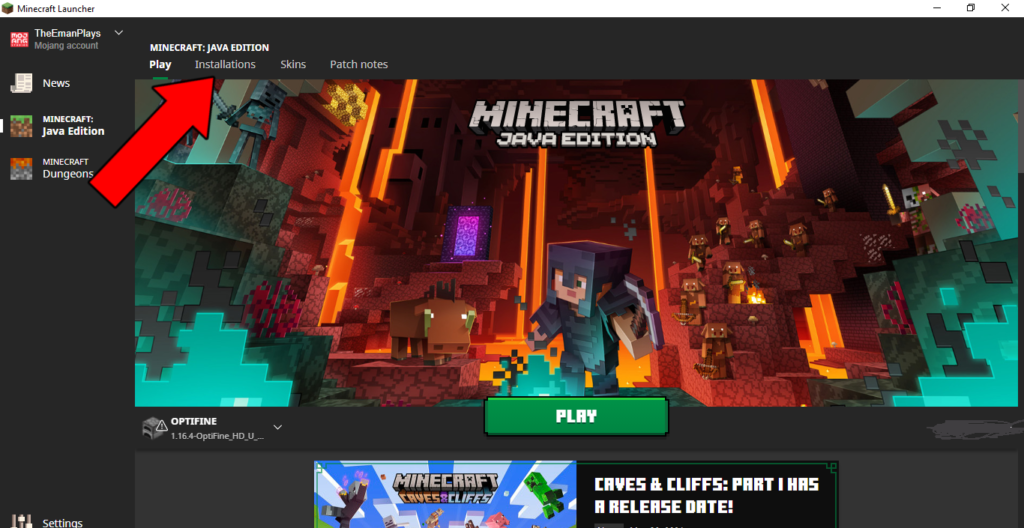
3. Check the box titled Snapshots in the top right corner.

4. Then the latest snapshot will appear at the bottom of the installation list.
How To Get Betas on Minecraft: Bedrock Edition:
- Go to the Microsoft store on Windows 10.
2. Search for the Xbox insider app and download it.
3. Open the app and click Previews.
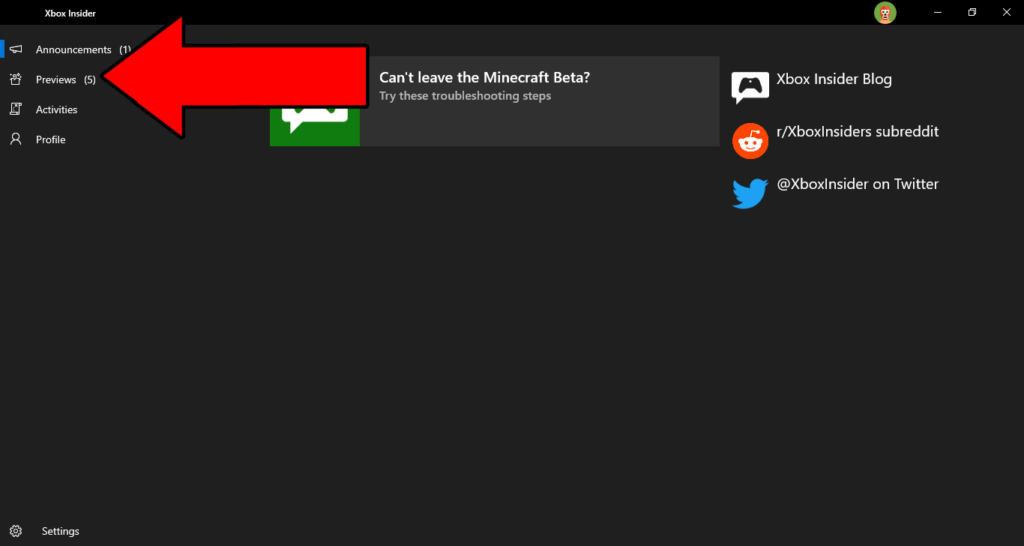
4. Under available click on Minecraft For Windows 10 and click on the join button.
If you want the Android or Xbox one instructions, Check out Mojang’s beta page for further instructions.
Credit: PCgamer
More Tutorials
–How To Transfer Minecraft Worlds From A iPhone To A iPad (iOS 11 or higher)
–How to screen record on Xbox one
–How to Play Minecraft with a Controller on iPhone or iPad in iOS 13 or iPadOS
Leave a Reply